载入中...
搜索中...
未找到
AnyCAD.Foundation.BaseApplication类 参考
基础应用程序类 更多...
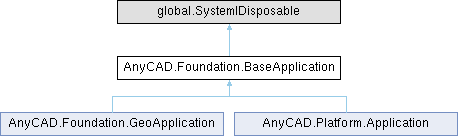
类 AnyCAD.Foundation.BaseApplication 继承关系图:
Public 成员函数 | |
| BaseApplication (global::System.IntPtr cPtr, bool cMemoryOwn) | |
| 仅供内部使用 | |
| void | Dispose () |
| BaseApplication () | |
| 构造函数 | |
| Viewer | GetActiveViewer () |
| bool | GetStandalone () |
| void | SetStandalone (bool val) |
| virtual bool | Initialize (Path basePath) |
| 初始化应用程序 | |
| virtual void | Destroy () |
| 释放资源 | |
| Viewer | CreateView (int hwndHost, uint width, uint height) |
| 在已有窗口上创建3D视图 | |
| Viewer | CreateWindow3D (string title, uint width, uint height, bool visible) |
| 创建独立3D窗口 | |
| void | SetActiveViewer (Viewer viewer) |
| 设置活动视图 | |
| virtual void | InstallListener (Viewer viewer) |
| 安装默认消息监听器 | |
| int | GetCommandStatus (string name) |
| 获取命令状态 | |
| bool | ExecuteCommand (string name, string parameters, bool clearEditor) |
| 执行命令 | |
| bool | ExecuteCommand (string name, string parameters) |
| 执行命令 | |
| bool | ExecuteCommand (string name) |
| 执行命令 | |
| bool | ExecuteCommand (string name, ParameterDict parameters, bool clearEditor) |
| 执行命令(参数字典版本) | |
| bool | ExecuteCommand (string name, ParameterDict parameters) |
| 执行命令(参数字典版本) | |
| string | QueryCommand (string name, ParameterDict parameters) |
| 查询命令结果 | |
| string | QueryCommand (string name, string parameters) |
| 查询命令结果(JSON版本) | |
| string | QueryCommand (string name) |
| 查询命令结果(JSON版本) | |
| bool | Input (string parameters) |
| 向当前编辑器输入参数 | |
| bool | Input (ParameterDict parameters) |
| 向当前编辑器输入参数(字典版本) | |
| bool | ExecuteEditorAction (string name, string params_) |
| 执行编辑器的子命令 | |
| bool | ExecuteEditorAction (string name) |
| 执行编辑器的子命令 | |
| bool | ExecuteEditorAction (string name, ParameterDict parameters) |
| 执行编辑器的子命令(字典版本) | |
| void | AddEventListener (AppEventListener pListener) |
| 添加应用级事件监听器 | |
| void | RemoveEventListener (AppEventListener pListener) |
| 移除事件监听器 | |
| Vector2 | GetDpiScale () |
| 获取显示器DPI缩放系数 | |
| void | SetActiveViewer (IRenderView viewer) |
| 设置当前视图 | |
静态 Public 成员函数 | |
| static bool | InternalRegisterSdk (string a, string b, string d, string e, string f) |
| static bool | InternalLoadResources (Path baseDirectory, string appName) |
详细描述
基础应用程序类
应用全局对象
显示应用程序的入口基类,管理视图创建、命令执行和事件处理。 提供统一的API接口用于创建3D视图、执行命令和管理文档。
成员函数说明
◆ AddEventListener()
| void AnyCAD.Foundation.BaseApplication.AddEventListener | ( | AppEventListener | pListener | ) |
添加应用级事件监听器
- 参数
-
pListener 监听器指针
注册全局事件监听器,接收应用级别的通知
◆ CreateView()
| Viewer AnyCAD.Foundation.BaseApplication.CreateView | ( | int | hwndHost, |
| uint | width, | ||
| uint | height ) |
在已有窗口上创建3D视图
- 参数
-
hwndHost 宿主窗口句柄 width 视图宽度 height 视图高度
- 返回
- 创建的视图查看器智能指针
在指定的窗口控件上嵌入3D渲染视图
◆ CreateWindow3D()
| Viewer AnyCAD.Foundation.BaseApplication.CreateWindow3D | ( | string | title, |
| uint | width, | ||
| uint | height, | ||
| bool | visible ) |
创建独立3D窗口
- 参数
-
title 窗口标题 width 窗口宽度 height 窗口高度 visible 是否立即可见
- 返回
- 创建的视图查看器智能指针
创建一个独立的3D渲染窗口
◆ Destroy()
|
virtual |
◆ ExecuteCommand() [1/5]
| bool AnyCAD.Foundation.BaseApplication.ExecuteCommand | ( | string | name | ) |
执行命令
- 参数
-
name 命令名称
- 返回
- true表示成功,false表示失败
执行指定的命令,支持JSON字符串参数
◆ ExecuteCommand() [2/5]
| bool AnyCAD.Foundation.BaseApplication.ExecuteCommand | ( | string | name, |
| ParameterDict | parameters ) |
执行命令(参数字典版本)
- 参数
-
name 命令名称 parameters 参数字典指针
- 返回
- true表示成功,false表示失败
使用参数字典执行命令
◆ ExecuteCommand() [3/5]
| bool AnyCAD.Foundation.BaseApplication.ExecuteCommand | ( | string | name, |
| ParameterDict | parameters, | ||
| bool | clearEditor ) |
执行命令(参数字典版本)
- 参数
-
name 命令名称 parameters 参数字典指针 clearEditor 是否清除原有编辑器
- 返回
- true表示成功,false表示失败
使用参数字典执行命令
◆ ExecuteCommand() [4/5]
| bool AnyCAD.Foundation.BaseApplication.ExecuteCommand | ( | string | name, |
| string | parameters ) |
执行命令
- 参数
-
name 命令名称 parameters JSON格式的参数对象字符串
- 返回
- true表示成功,false表示失败
执行指定的命令,支持JSON字符串参数
◆ ExecuteCommand() [5/5]
| bool AnyCAD.Foundation.BaseApplication.ExecuteCommand | ( | string | name, |
| string | parameters, | ||
| bool | clearEditor ) |
执行命令
- 参数
-
name 命令名称 parameters JSON格式的参数对象字符串 clearEditor 是否清除原有编辑器,默认为true
- 返回
- true表示成功,false表示失败
执行指定的命令,支持JSON字符串参数
◆ ExecuteEditorAction() [1/3]
| bool AnyCAD.Foundation.BaseApplication.ExecuteEditorAction | ( | string | name | ) |
执行编辑器的子命令
- 参数
-
name 子命令名称
- 返回
- true表示成功,false表示失败
执行当前编辑器的特定动作
◆ ExecuteEditorAction() [2/3]
| bool AnyCAD.Foundation.BaseApplication.ExecuteEditorAction | ( | string | name, |
| ParameterDict | parameters ) |
执行编辑器的子命令(字典版本)
- 参数
-
name 子命令名称 parameters 参数字典指针
- 返回
- true表示成功,false表示失败
使用参数字典执行编辑器动作
◆ ExecuteEditorAction() [3/3]
| bool AnyCAD.Foundation.BaseApplication.ExecuteEditorAction | ( | string | name, |
| string | params_ ) |
执行编辑器的子命令
- 参数
-
name 子命令名称 params JSON格式参数字符串
- 返回
- true表示成功,false表示失败
执行当前编辑器的特定动作
◆ GetCommandStatus()
| int AnyCAD.Foundation.BaseApplication.GetCommandStatus | ( | string | name | ) |
获取命令状态
- 参数
-
name 命令名称
- 返回
- 0=禁用, 1=启用, 2=已选中
查询指定命令的当前可用状态
◆ GetDpiScale()
| Vector2 AnyCAD.Foundation.BaseApplication.GetDpiScale | ( | ) |
获取显示器DPI缩放系数
- 返回
- DPI缩放向量(x, y)
返回当前显示器的水平和垂直DPI缩放比例
◆ Initialize()
|
virtual |
初始化应用程序
- 参数
-
basePath 程序EXE所在目录路径
- 返回
- true表示成功,false表示失败
内部调用,初始化资源管理器、加载配置等
被 AnyCAD.Foundation.GeoApplication , 以及 AnyCAD.Platform.Application 重载.
◆ Input() [1/2]
| bool AnyCAD.Foundation.BaseApplication.Input | ( | ParameterDict | parameters | ) |
向当前编辑器输入参数(字典版本)
- 参数
-
parameters 参数字典指针
- 返回
- true表示成功,false表示失败
使用参数字典向编辑器传递数据
◆ Input() [2/2]
| bool AnyCAD.Foundation.BaseApplication.Input | ( | string | parameters | ) |
向当前编辑器输入参数
- 参数
-
parameters JSON格式参数字符串
- 返回
- true表示成功,false表示失败
将参数传递给当前活动的编辑器进行处理
◆ InstallListener()
|
virtual |
◆ QueryCommand() [1/3]
| string AnyCAD.Foundation.BaseApplication.QueryCommand | ( | string | name | ) |
查询命令结果(JSON版本)
- 参数
-
name 命令名称
- 返回
- 查询结果字符串
使用JSON参数执行查询命令
◆ QueryCommand() [2/3]
| string AnyCAD.Foundation.BaseApplication.QueryCommand | ( | string | name, |
| ParameterDict | parameters ) |
查询命令结果
- 参数
-
name 命令名称 parameters 参数字典指针
- 返回
- 查询结果字符串
执行查询类命令并返回结果
◆ QueryCommand() [3/3]
| string AnyCAD.Foundation.BaseApplication.QueryCommand | ( | string | name, |
| string | parameters ) |
查询命令结果(JSON版本)
- 参数
-
name 命令名称 parameters JSON格式参数字符串
- 返回
- 查询结果字符串
使用JSON参数执行查询命令
◆ RemoveEventListener()
| void AnyCAD.Foundation.BaseApplication.RemoveEventListener | ( | AppEventListener | pListener | ) |
移除事件监听器
- 参数
-
pListener 监听器指针
注销之前注册的事件监听器
◆ SetActiveViewer() [1/2]
| void AnyCAD.Foundation.BaseApplication.SetActiveViewer | ( | IRenderView | viewer | ) |
设置当前视图
- 参数
-
viewer
◆ SetActiveViewer() [2/2]
| void AnyCAD.Foundation.BaseApplication.SetActiveViewer | ( | Viewer | viewer | ) |
设置活动视图
- 参数
-
viewer 视图查看器智能指针
将指定视图设置为当前活动的视图