载入中...
搜索中...
未找到
AnyCAD.Foundation.CommandContext类 参考
命令执行上下文类 更多...
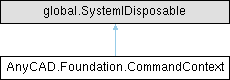
类 AnyCAD.Foundation.CommandContext 继承关系图:
Public 成员函数 | |
| CommandContext (global::System.IntPtr cPtr, bool cMemoryOwn) | |
| 仅供内部使用 | |
| void | Dispose () |
| CommandContext () | |
| 默认构造函数 | |
| CommandContext (Viewer pViewer, Document pDoc, ParameterDict parameters) | |
| 构造命令上下文 | |
| Viewer | GetViewer () |
| void | SetViewer (Viewer val) |
| Document | GetDocument () |
| void | SetDocument (Document val) |
| ParameterDict | GetParameters () |
| void | SetParameters (ParameterDict val) |
| ParameterDict | GetOutput () |
| bool | GetClearPreviousEditor () |
| void | SetClearPreviousEditor (bool val) |
| string | GetErrorMessage () |
| void | SetErrorMessage (string val) |
| ObjectId | GetObjectId () |
| 获取当前输入的操作对象ID | |
| void | SetObjectId (ObjectId id) |
| 设置当前输入操作对象ID | |
| EnumEditorTrigger | GetTrigger () |
| 获取触发方式 | |
| SelectionManager | GetSelectionManager () |
| 获取当前选择集管理器 | |
| bool | IsBatchMode () |
| 检查是否为批处理模式 | |
详细描述
命令执行上下文类
封装命令执行所需的所有环境信息,包括视图、文档、参数等。 提供统一的接口访问命令执行环境。
构造及析构函数说明
◆ CommandContext()
| AnyCAD.Foundation.CommandContext.CommandContext | ( | Viewer | pViewer, |
| Document | pDoc, | ||
| ParameterDict | parameters ) |
构造命令上下文
- 参数
-
pViewer 视图对象指针 pDoc 文档对象指针 parameters 输入参数字典
成员函数说明
◆ GetObjectId()
| ObjectId AnyCAD.Foundation.CommandContext.GetObjectId | ( | ) |
获取当前输入的操作对象ID
- 返回
- 返回对象ID
用于跟踪用户当前选择的对象
◆ GetSelectionManager()
| SelectionManager AnyCAD.Foundation.CommandContext.GetSelectionManager | ( | ) |
获取当前选择集管理器
- 返回
- 返回选择集管理器指针
◆ GetTrigger()
| EnumEditorTrigger AnyCAD.Foundation.CommandContext.GetTrigger | ( | ) |
获取触发方式
- 返回
- 返回编辑器触发枚举值
◆ IsBatchMode()
| bool AnyCAD.Foundation.CommandContext.IsBatchMode | ( | ) |
检查是否为批处理模式
- 返回
- true 表示批处理模式
批处理模式下,带Editor的命令不进入Editor,直接执行
◆ SetObjectId()
| void AnyCAD.Foundation.CommandContext.SetObjectId | ( | ObjectId | id | ) |
设置当前输入操作对象ID
- 参数
-
id 对象ID